
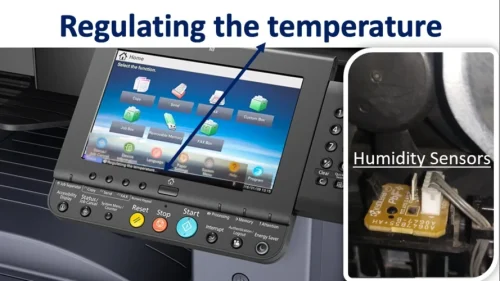
The Kyocera TASKalfa 3212i is one of the most reliable A3 multifunction machines used across offices in Tamil Nadu. However, in some locations—especially during peak summer—users may encounter the “Regulating the Temperature” error.
This issue can suddenly stop printing operations and affect productivity. In this article, we explain the causes, operating conditions, and safe solution approach for this error.
What is “Regulating the Temperature” Error?
This error is related to the fuser unit temperature control system. The machine continuously monitors heat levels using a temperature sensor assembly.
If:
- The temperature rises beyond acceptable range
- The sensor fails to regulate heat properly
- The internal environment becomes unstable
The machine triggers a protective error to prevent further damage.
This is a safety protection mechanism, not a basic software glitch.
Official Operating Environment (As Per Service Guidelines)
The recommended operating conditions for Kyocera 3212i are:
| Temperature | 10 to 32.5°C (50 to 90.5°F) |
|---|---|
| Humidity | 10 to 80% RH |
In Tamil Nadu, especially during summer months, room temperature often exceeds 35°C. When the machine is installed in:
- Non-AC rooms
- Poor ventilation areas
- Rooms with direct sunlight exposure
The internal fuser temperature may exceed limits — triggering the regulating temperature error.
Why This Error Commonly Occurs in Tamil Nadu and Across India
Based on field experience, the main reasons are:
| Cause | What it means |
|---|---|
| High ambient room temperature | The room is hotter than the recommended 32.5°C limit. |
| Dust on temperature sensor | Dust affects how the sensor reads heat. |
| Poor air circulation | The machine cannot release heat if it is too close to walls or in a closed space. |
| Voltage fluctuation | Unstable power affects fuser heating control. |
| Internal fuser pressure issues | A mechanical issue inside the fuser system. |
In many cases, overheating is the primary cause.
Is There an Official Remedy in the Service Manual?
As per the official service documentation: there is no direct permanent remedy listed for this specific error.
However, Kyocera provides a special temperature sensor firmware package for certain cases.
- This is not a regular firmware update
- It is a special firmware
- The firmware package contains only 4 specific files
- It must be installed carefully under technical supervision
This firmware is generally used when temperature sensor behavior requires recalibration.
Basic Inspection Procedure (For Professional Technicians)
Below is a high-level outline of the temperature sensor access procedure (for technical reference only):
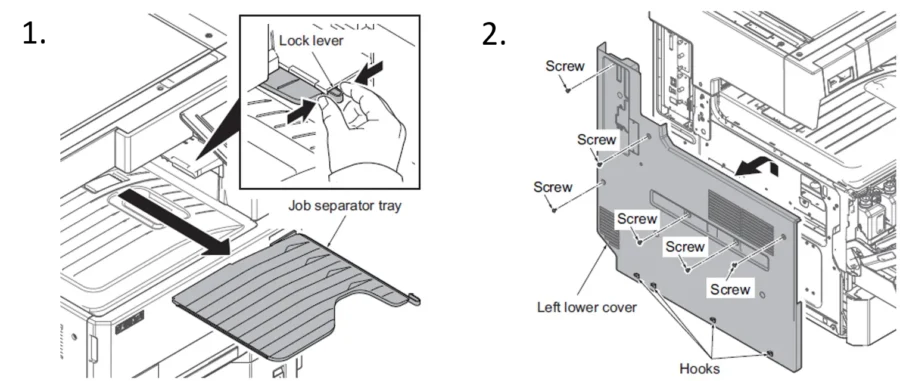
- Remove rear upper and lower covers, then remove drive unit 1
- Open right cover 1 and 2, remove right rear cover
- Disconnect connector
- Release wires from saddles
- Remove fuser press release motor assembly
- Remove cassette
- Open front cover
- Detach screws and release hooks
- Remove left lower cover
- Remove inner tray
- Release hooks
- Remove temperature sensor assembly
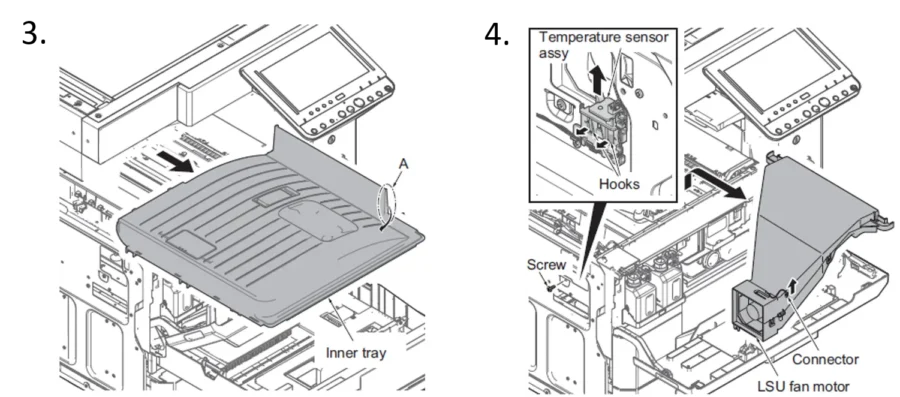
Cleaning the sensor area may help in certain situations.
However, this process involves dismantling multiple mechanical components. It should only be performed by trained service engineers.
Important: Do Not Attempt Full Repair Yourself
While cleaning and environmental correction may help, installing special firmware or replacing the temperature sensor assembly requires:
- Authorized firmware access
- Technical calibration
- Proper ESD safety handling
- Fuser system testing
- Permanent fuser damage
- Main board issues
- Warranty complications
Preventive Tips to Avoid Temperature Error
- Install machine in air-conditioned or well-ventilated room
- Keep machine away from walls (minimum clearance required)
- Avoid direct sunlight
- Use proper voltage stabilizer
- Perform periodic preventive maintenance
Regular maintenance significantly reduces temperature-related errors.
Frequently Asked Questions
Why does my Kyocera 3212i show “Regulating the Temperature”?
The fuser temperature control system has detected a problem, such as the temperature rising beyond the acceptable range or the sensor failing to regulate heat. It is a protective error to prevent further damage.
Is it caused by a software problem?
No. It is a safety protection mechanism, not a basic software glitch. Overheating from a hot or poorly ventilated room is the most common cause.
What is the special temperature sensor firmware?
It is a special Kyocera firmware package of 4 specific files, not a regular update. It is used when temperature sensor behavior requires recalibration and must be installed under technical supervision.
Can I clean the sensor myself?
Cleaning may help in some cases, but reaching the sensor means dismantling several mechanical parts. It should be done only by trained service engineers.
Professional Support in Tamil Nadu
If your Kyocera 3212i shows the “Regulating the Temperature” error and basic checks do not resolve the issue, professional intervention is required.
Exact International is an authorized Kyocera dealer in Chennai with access to:
- Official special temperature sensor firmware
- Genuine spare parts
- Trained Kyocera-certified engineers
- Advanced diagnostic support
If firmware installation is required, we have the official special firmware package.
Need printer drivers? Visit our Printer Driver Download Center.
Need Immediate Support?
If your machine is down due to temperature error, don’t wait.
Contact Kesavan – 8189997838
Exact International – Chennai
[email protected]
We provide fast on-site support across Tamil Nadu.
