
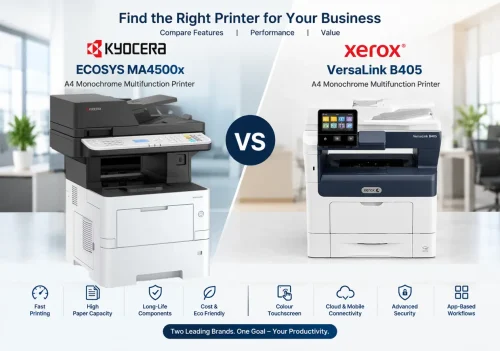
Choosing the right office printer is important for improving productivity, managing printing costs, and maintaining a smooth document workflow. Two models worth comparing are the Kyocera ECOSYS MA4500x and the Xerox VersaLink B405.
Both are A4 monochrome multifunction printers designed for business environments that require fast, reliable black-and-white document printing. However, they differ in their user interface, paper-handling options, document workflow features, and consumable configurations.
In this comparison of the Kyocera ECOSYS MA4500x vs Xerox VersaLink B405, we examine their key specifications, features, advantages, and suitability for different business requirements.
- 1. Quick comparison table
- 2. Printing speed and performance
- 3. Paper capacity and handling
- 4. Document feeder and platen glass
- 5. User interface and ease of operation
- 6. Toner, consumables and running costs
- 7. Power consumption
- 8. Connectivity and document workflow
- 9. Security features
- 10. Which printer should you choose?
- 11. Final verdict
- FAQ
1. Kyocera ECOSYS MA4500x vs Xerox VersaLink B405: Quick Comparison
| Feature | Kyocera ECOSYS MA4500x | Xerox VersaLink B405 |
|---|---|---|
| Printer type | A4 monochrome multifunction printer | A4 monochrome multifunction printer |
| Print speed (A4) | Up to 45 pages per minute | Up to 45 pages per minute |
| Print resolution | Up to 1200 dpi-class output modes, including Fine 1200 | Up to 1200 × 1200 dpi enhanced |
| First-page print time | Up to 5.3 seconds or less | As fast as 8 seconds |
| Standard paper capacity | 600 sheets | 700 sheets |
| Maximum paper capacity | Up to 2,600 sheets | Up to 2,350 sheets |
| Automatic duplex printing | Yes | Yes |
| Document feeder | Standard (Max. 75 sheets RADF) | 60-sheet reversing automatic document feeder |
| Platen glass scan size | Up to Legal size (8.5 × 14 in) | A4 size only |
| Control panel | 5-line LCD on MA4500x | 5-inch colour touchscreen |
| Standard memory | 1 GB | 2 GB |
| Power consumption – copy / print | 584.7 W / 601.6 W | 620 W or less (continuous printing) |
| Power consumption – standby | 54.9 W | 60 W or less (Ready mode) |
| Power consumption – energy saver | 0.5 W | 4 W or less (Energy Saver / Sleep) |
| Network connectivity | Gigabit Ethernet and USB | Gigabit Ethernet and USB 3.0 |
| Mobile printing | Supported options and compatible services | AirPrint, Mopria and other supported services |
| High-yield toner information | TK-3405, approximately 12,500 pages | Approximately 25,000 pages |
| Best suited for | Businesses prioritising long-life design and expandable paper capacity | Businesses prioritising touchscreen operation and connected document workflows |
✔ marks the stronger published figure in that row. Specifications are based on the supplied product brochures. Features and configurations should be confirmed for the exact regional model before purchasing.
2. Printing Speed and Everyday Performance
Both printers offer a rated print speed of up to 45 pages per minute for A4 monochrome printing.
Kyocera ECOSYS MA4500x
The Kyocera ECOSYS MA4500x is designed for offices that need to print business documents quickly and consistently. Its first-page print time is specified at 5.3 seconds or less, helping reduce waiting time when printing short documents.
Its long-life component design is intended to reduce the frequency of consumable replacement and support efficient operation over the life of the machine.
Xerox VersaLink B405
The Xerox VersaLink B405 also delivers up to 45 A4 pages per minute. Its first-page print time is specified at approximately 8 seconds.
The B405 combines printing performance with Xerox ConnectKey technology, offering tools designed to simplify everyday document tasks.
Comparison: Both models provide the same rated A4 print speed. The published first-page figures favour the Kyocera MA4500x, although actual performance depends on document complexity, device settings, and operating conditions.
3. Paper Capacity and Handling
Paper capacity is an important consideration for businesses with high-volume printing requirements.
Kyocera ECOSYS MA4500x
The supplied Kyocera brochure specifies a standard paper capacity of 600 sheets, consisting of a 500-sheet cassette and a 100-sheet multipurpose tray.
With optional PF-3110 paper feeders, the paper capacity can be expanded to a maximum of 2,600 sheets. This allows businesses to reduce the frequency of paper replenishment.
Xerox VersaLink B405
The Xerox VersaLink B405 offers a standard capacity of 700 sheets, including a 550-sheet main tray and a 150-sheet bypass tray.
Its paper capacity can be expanded to 2,350 sheets by adding optional paper trays.
Comparison: The Xerox B405 has a higher standard paper capacity, while the Kyocera MA4500x offers a higher maximum capacity according to the supplied brochures. Businesses should consider their daily print volume and paper-handling needs when selecting a model.
4. Document Feeder and Platen Glass Size
For offices that scan and copy a lot of paperwork, the document feeder and the platen glass (scanner glass) matter as much as print speed.
Kyocera ECOSYS MA4500x
The Kyocera ECOSYS MA4500x comes with a standard reversing automatic document feeder (RADF) that holds a maximum of 75 sheets.
Its platen glass can scan pages up to Legal size (8.5 × 14 inches). This is useful for contracts, legal papers, and longer documents that do not fit on an A4 glass.
Xerox VersaLink B405
The Xerox VersaLink B405 has a 60-sheet reversing automatic document feeder. Its platen glass can scan A4 size pages only.
| Scanning feature | Kyocera ECOSYS MA4500x | Xerox VersaLink B405 |
|---|---|---|
| Document feeder | Standard (Max. 75 sheets RADF) | 60-sheet reversing ADF |
| Platen glass scan size | Up to Legal size (8.5 × 14 in) | A4 size only |
Comparison: The Kyocera MA4500x has the advantage for businesses that scan or copy Legal-size documents from the glass, and its feeder holds more sheets. If you only handle A4 documents, the Xerox B405 platen glass is enough.
5. User Interface and Ease of Operation
Kyocera ECOSYS MA4500x
The MA4500x uses a 5-line LCD control panel. It provides a straightforward interface for everyday printer operations.
Xerox VersaLink B405
The Xerox VersaLink B405 features a 5-inch colour touchscreen with a customisable interface. Users can access functions through a familiar touch-based layout and configure one-touch applications for frequently repeated tasks.
This approach can be useful for workplaces where several employees regularly use the same multifunction printer.
Comparison: The Xerox B405 has the advantage for businesses that prefer a colour touchscreen and configurable on-device workflows. The Kyocera MA4500x offers a more conventional LCD interface.
6. Toner, Consumables and Long-Term Running Costs
The purchase price is only one part of the cost of owning an office printer. Toner, maintenance, replacement components, and service requirements also affect the total cost of ownership.
Kyocera ECOSYS MA4500x
Kyocera’s ECOSYS technology focuses on economy, ecology, and system reliability. The supplied brochure highlights a long-life drum design intended to reduce the frequency of component replacement.
The listed TK-3405 toner has an approximate stated yield of 12,500 pages under the specified ISO testing method.
Xerox VersaLink B405
The Xerox brochure lists a standard toner cartridge yield of approximately 25,000 pages and a drum cartridge yield of approximately 65,000 pages.
These figures can help businesses estimate replacement intervals, but actual yields vary according to print coverage, document type, and usage patterns.
| Consumable | Kyocera ECOSYS MA4500x | Xerox VersaLink B405 |
|---|---|---|
| Toner | TK-3405, approximately 12,500 pages | Approximately 25,000 pages |
| Drum | Long-life drum design | Approximately 65,000 pages |
Comparison: The listed Xerox toner cartridge has a higher stated page yield. However, this does not automatically mean the Xerox has a lower cost per page. A fair comparison requires the actual local prices of compatible original toner cartridges, maintenance parts, and service.
7. Power Consumption
Power consumption affects electricity cost, especially in offices where the printer stays on all day. The brochures list the following figures:
| Mode | Kyocera ECOSYS MA4500x | Xerox VersaLink B405 |
|---|---|---|
| Copy / print (continuous printing) | 584.7 W / 601.6 W | 620 W or less |
| Standby (Ready mode) | 54.9 W | 60 W or less |
| Energy Saver / Sleep mode | 0.5 W | 4 W or less |
Comparison: Based on the listed figures, the Kyocera MA4500x has lower power consumption in every mode, with the biggest gap in Energy Saver mode (0.5 W against 4 W or less). Actual electricity use depends on how often the machine prints and how long it stays in standby or sleep. The two brochures may also use different test conditions.
8. Connectivity and Document Workflow
Kyocera ECOSYS MA4500x
The Kyocera brochure lists Gigabit Ethernet, USB connectivity, and support for compatible mobile-printing services. The wider ECOSYS series also supports applications such as KYOCERA Mobile Print, AirPrint, and Mopria.
Some wireless capabilities require optional hardware, so buyers should verify the exact configuration of the MA4500x.
Xerox VersaLink B405
The Xerox VersaLink B405 supports Gigabit Ethernet, USB 3.0, and optional Wi-Fi and Wi-Fi Direct through the appropriate kit.
Its ConnectKey platform includes mobile-printing support and connectivity options for cloud services. The brochure also describes scan preview, optical character recognition (OCR), and workflow applications.
Comparison: The Xerox B405 places particular emphasis on touchscreen-driven workflows, cloud connectivity, and application-based features. The Kyocera MA4500x offers business-oriented printing and document handling, with the exact scanning and wireless capabilities depending on its configuration.
9. Security Features
Protecting business documents is important for offices that handle customer records, financial information, invoices, and confidential paperwork.
The Kyocera ECOSYS series brochure describes security options including data encryption, data overwriting, Trusted Platform Module support, and secure document output features. Some functions depend on optional hardware or the selected model.
The Xerox VersaLink B405 brochure lists security features including Secure Print, access controls, encrypted data, network security protocols, and support for card-based authentication.
Comparison: Both product families offer security capabilities. The best choice depends on the security functions enabled in the exact device configuration and the organisation’s IT requirements.
10. Which Printer Should You Choose?
Choose the Kyocera ECOSYS MA4500x if:
- You need an A4 monochrome multifunction printer with a rated speed of 45 pages per minute.
- You value a long-life component design.
- You want the option to expand paper capacity to a high maximum.
- You prefer a straightforward LCD control panel.
- You need to scan Legal-size (8.5 × 14 in) pages on the platen glass, or want a 75-sheet RADF.
- Lower power consumption is important to you.
- You want to evaluate running costs using Kyocera’s toner and maintenance specifications.
Choose the Xerox VersaLink B405 if:
- You prefer a colour touchscreen interface.
- You want configurable on-device applications and workflow shortcuts.
- Cloud-connected document workflows are important to your team.
- You value the listed toner yield of approximately 25,000 pages.
- You need the Xerox ConnectKey feature set and compatible workflow integrations.
- You only scan A4-size pages on the platen glass.
11. Final Verdict: Kyocera ECOSYS MA4500x vs Xerox VersaLink B405
The Kyocera ECOSYS MA4500x and Xerox VersaLink B405 are both capable options for businesses requiring fast A4 monochrome printing.
The Kyocera ECOSYS MA4500x stands out for its published first-page print time, long-life component philosophy, expandable paper capacity, Legal-size platen glass scanning, 75-sheet RADF, and lower stated power consumption.
The Xerox VersaLink B405 stands out for its colour touchscreen, configurable workflow applications, and listed high-yield toner cartridge.
There is no single best choice for every business. The right printer depends on the required features, print volume, consumable prices, maintenance arrangements, and available service support.
Before purchasing either model, compare the complete cost of ownership and confirm the specifications of the exact model being offered.
Frequently Asked Questions
Which printer is faster, the Kyocera ECOSYS MA4500x or the Xerox VersaLink B405?
Both have a rated print speed of up to 45 A4 pages per minute. The published first-page time favours the Kyocera MA4500x at 5.3 seconds or less, against about 8 seconds for the Xerox VersaLink B405.
Which has more paper capacity?
The Xerox VersaLink B405 has the higher standard capacity at 700 sheets, against 600 sheets for the Kyocera MA4500x. The Kyocera can be expanded to 2,600 sheets, while the Xerox expands to 2,350 sheets.
Does the Kyocera ECOSYS MA4500x have a touchscreen?
No. The MA4500x uses a 5-line LCD control panel. The 7-inch colour touchscreen in the Kyocera brochure belongs to other models in the series, such as the MA4500ix and MA4500ifx. The Xerox VersaLink B405 has a 5-inch colour touchscreen.
What is the toner yield of each printer?
The Kyocera TK-3405 high-yield toner is rated at approximately 12,500 pages. The Xerox VersaLink B405 standard toner cartridge is listed at approximately 25,000 pages. Actual cost per page depends on local toner prices, maintenance parts and service.
What size can the platen glass scan on each printer?
The Kyocera ECOSYS MA4500x platen glass can scan up to Legal size (8.5 × 14 inches). The Xerox VersaLink B405 platen glass can scan A4 size pages only.
Which printer uses less power?
The listed figures favour the Kyocera MA4500x: 584.7 W copy and 601.6 W print, 54.9 W in standby and 0.5 W in Energy Saver. The Xerox VersaLink B405 lists 620 W or less when printing continuously, 60 W or less in Ready mode and 4 W or less in Energy Saver / Sleep mode.
Which printer is better for my business?
There is no single best choice. The Kyocera MA4500x suits businesses that value a long-life design and expandable paper capacity. The Xerox B405 suits businesses that want a colour touchscreen and configurable workflow applications.
Need Help Choosing the Right Office Printer?
At Exact International, we help businesses evaluate printing solutions according to their document volume, workflow requirements, and operating costs.
Contact our team to discuss the Kyocera ECOSYS MA4500x and Xerox VersaLink B405, request product information, and identify the most suitable solution for your office. Looking for another Kyocera model? See the Kyocera ECOSYS MA4000x or our Kyocera and Xerox dealers in Chennai.
Make an informed decision before investing in your next office printer.
📞 Phone / WhatsApp: 9094095551
📧 Email: [email protected]
▶ YouTube: EXACT MFD INFO
