
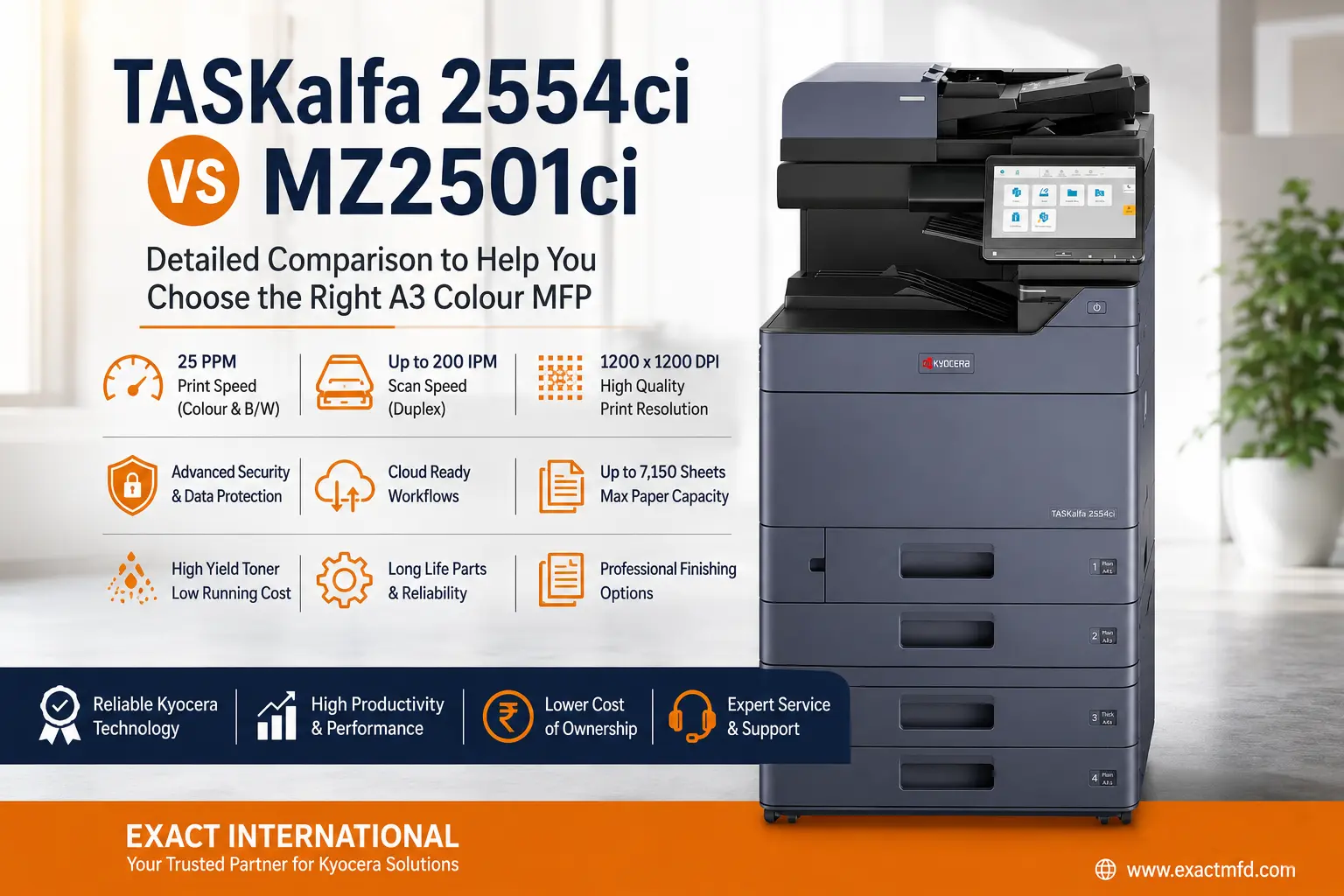
TASKalfa 2554ci vs MZ2501ci | Exact International Photocopier Comparison Guide Two proven A3 colour engines. One important decision. Both machines are rated at 25 ppm in colour and black & white. The difference is in what sits underneath — storage, security, toner economics and how ready each platform is for cloud-connected document workflows. Here’s the full spec-by-spec breakdown. Evolution Series TASKalfa 2554ci Reliable, productivity-focused colour MFP Print speed25 ppm colour / B&W Standard SSD32 GB Toner yield25K K / 12K colour Best forConventional office value vs Cloud-Ready Platform TASKalfa MZ2501ci Cloud, security & document-workflow focused Print speed25 ppm colour / B&W Standard SSD64 GB Toner yield25K K / 12K colour Best forCloud & security-led offices Quick Comparison Kyocera TASKalfa 2554ci vs MZ2501ci — at a glance Feature TASKalfa 2554ci TASKalfa MZ2501ci New 2026 Machine type A3 colour MFP A3 colour MFP A4 print speed 25 ppm colour / B&W 25 ppm colour / B&W A3 print speed Up to 12 ppm Up to 12 ppm Print resolution Up to 1,200 × 1,200 dpi 1,200 × 1,200 dpi RAM 4 GB 4 GB Standard SSD 32 GB 64 GB (Asia brochure) Standard paper capacity 1,150 sheets 1,150 sheets Maximum paper capacity 7,150 sheets 7,150 sheets Paper size — Cassette Min. A6R – Max. SRA3 (320mm × 450mm); Cassette 1: Min. A6R – Max. A4R (Legal) Min. A6R – Max. SRA3 (320mm × 450mm); Cassette 1: Min. A6R – Max. A4R (Legal) Paper size — MPT Min. A6R – Max. SRA3 (320mm × 450mm) & Banner Print (1,220mm × 304.8mm) Min. A6R – Max. SRA3 (320mm × 450mm) & Banner Print (1219.2mm × 304.8mm) Max. paper weight 300 g/m² 300 g/m² Duplex weight range 60–256 g/m² 60–256 g/m² Max. scan speed 100 ipm simplex / 200 duplex 100 ipm simplex / 200 duplex Standard panel 10.1″ colour touchscreen 10.1″ touchscreen Toner yield TK-8360 — 25K black / 12K colour TK-8450 — 25K black / 12K colour Maintenance kit MK-8335 (A/B): 200,000 pages · MK-8345 (D/E): 600,000 pages MK-8335 (A/B): 200,000 pages · MK-8345 (D/E): 600,000 pages Fiery Optional Optional Cloud workflow Fleet solutions available Stronger cloud-ready platform Security Advanced Newer, more comprehensive Best for Value & conventional workflows Cloud, security & digital workflows Exact configuration and consumable part numbers can vary by market — confirm the final India specification before placing an order. Detailed Comparison 01 Tie Print speed — 25 ppm on both machines Both the 2554ci and MZ2501ci are rated at 25 pages per minute in colour and black & white, with roughly 12 A3 pages per minute. That covers corporate offices, schools, government departments, design studios and internal document production equally well. If 25 ppm colour output is your baseline requirement, neither machine holds a speed advantage. 02 Tie Print quality and resolution Both machines output up to 1,200 × 1,200 dpi. The 2554ci adds Handwriting Emphasis and Super Resolution features; the MZ2501ci scans and copies at 600 × 600 dpi. For presentations, brochures, reports, marketing material and everyday corporate documents, both deliver excellent quality. 03 Tie Scanning speed With the right document processor, the 2554ci reaches 100 ipm simplex / 200 ipm duplex (DP-7140 and DP-7150 options run slower at 50/16 and 80/48 ipm). The MZ2501ci matches 200 ipm duplex with the DP-7160/DP-7170. High-volume digitisation of contracts, invoices, student records or archive documents benefits equally from either — configured correctly. Configuration matters: a 2554ci with a basic document processor won’t match a 2554ci fitted with the DP-7160/7170 — the same logic applies to the MZ2501ci. Always compare the full build, not just the base engine. 04 Tie Toner yield and running cost Both machines share the same yield class on their India-spec toner. The TASKalfa 2554ci uses TK-8360 — 25,000 pages black (K), 12,000 pages each for cyan/magenta/yellow. The TASKalfa MZ2501ci uses TK-8450 — the same yield: 25,000 pages black (K), 12,000 pages each for cyan/magenta/yellow. Fewer toner changes reduce downtime and stock-management effort Higher-yield cartridges suit consistently high-volume printing Real cost-per-page depends on toner price, coverage and colour/mono ratio 05 Tie Maintenance kit & long-life components Both machines share the same maintenance kit lineup — MK-8335 (A/B) rated for 200,000 pages, and MK-8345 (D/E) rated for 600,000 pages. Built on Kyocera’s long-life drum philosophy, this reduces the frequency of major service interventions for businesses with steady monthly volumes. Total cost of ownership isn’t just toner price ÷ yield — factor in drum life, developer life, waste toner, service labour, preventive maintenance and finisher upkeep. This is where dealer service support earns its keep. 06 MZ2501ci SSD and storage The 2554ci ships with a 32 GB standard SSD. The supplied MZ series brochure lists 64 GB standard on the MZ2501ci — useful for document boxes, stored jobs, scan workflows and HyPAS applications. Note that Kyocera’s current US spec for the MZ2501ci lists a 256 GB SSD, so region matters; confirm the India build before quoting a fixed figure. 07 Tie First copy / first print time Both machines are specified at approximately 6.4s black / 8.5s colour for first copy, and 7.0s black / 9.2s colour for first print — practically indistinguishable for day-to-day office response. 08 Tie Paper capacity & media handling Standard capacity is two 500-sheet cassettes plus a 150-sheet multipurpose tray, expandable to 7,150 sheets. Both support SRA3 media up to ~300 g/m², with duplex up to 256 g/m². Optional 500-sheet feeders, 1,500 × 2-sheet feeders and a 3,000-sheet large-capacity side deck are available on both platforms. 09 Tie Finishing options Stapling, punching, booklet-making, Z-folding, inserters, mailboxes and high-capacity finishers (1,000- and 4,000-sheet on the MZ series) are available across both — enabling a print → duplex → fold → staple → booklet flow largely without leaving the machine. 10 MZ2501ci Fiery & professional colour workflow The MZ series brochure specifically lists an optional Fiery Controller and interface kit, alongside Kyocera’s Tiered Color System and Color Optimizer. For agencies, publishers, print shops and brand-sensitive production, this makes the MZ2501ci the stronger colour-management platform —

How to Configure Scan to PC (Scan to SMB) on Photocopier Machines – Complete Setup Guide
If your photocopier supports Scan to SMB (Scan to Folder), you can scan documents directly to a shared folder on your windows computer without using a USB drive. This guide explains the basic configuration process used on most multifunction photocopier brands, including Kyocera, Canon, Konica Minolta, Ricoh, HP, and Xerox. Although menu names may differ slightly, the overall setup process is very similar. What is Scan to SMB configuration? Scan to SMB (Server Message Block) allows a photocopier to send scanned documents directly to a shared folder on a Windows PC over the local network. Instead of scanning to email or USB, the scanned file is automatically saved to a folder on your computer. Before You Start Make sure you have the following information: Photocopier IP Address Computer IP Address Computer Name (Host Name) Windows Username Windows Password Shared Folder Name Administrator access to the photocopier Step 1 – Verify Both Devices Are on the Same Network Before configuring Scan to SMB, ensure that your photocopier and your computer are connected to the same local network. Find Your Computer IP Address Press Windows + R Type cmd Press Enter Type: ipconfig You will see something like: Computer IP Address – 192.168.1.70 (For Example) Find the Photocopier IP Address You can find the machine IP address in several ways: Method 1 – Print the Machine Status Page. Method 2- Open the Network Information screen from the photocopier control panel. Method 3 (If Printing Already Works) – On Windows: Control Panel → Devices and Printers → Right-click your printer→ Printer Properties → Ports Example: 192.168.1.40 Step 2 – Create a Shared Folder Create a folder where scanned files will be saved. Example: D:Scan Share the Folder Right-click the folder. Select Properties. Open the Sharing tab. Click Share. Add Everyone. Set the permission to Read/Write. Click Share. Configure Advanced Sharing Still inside the folder properties: Open Advanced Sharing Tick Share this folder Click Permissions Allow Full Control Click OK Step 3 – Configure Windows Sharing Open: Control Panel → Network and Sharing Center ↓ Advanced Sharing Settings and Verify the following settings. Private Network ✅ Network Discovery – ON ✅ File and Printer Sharing – ON Public Network ✅ Network Discovery – ON ✅ File and Printer Sharing – ON All Networks ✅ Public Folder Sharing – ON ✅ Password Protected Sharing – OFF (only if it aligns with your organization’s security policy; otherwise leave it on and configure the copier with valid credentials). Your shared folder is now ready. Step 4 – Verify Windows Username and Password The photocopier needs valid Windows login credentials. To verify your username: Press Windows + L Your Windows login screen will display your username. Example Username Admin Password ******** Keep these details ready. Information Required Before SMB Configuration Before configuring the machine, make sure you have: Machine IP – 192.168.1.40Computer IP – 192.168.1.70 (OR) Computer Name – DESKTOP-PC1 Shared Folder – Scan Username – Admin Password – ******** Step 5 – Configure Scan to SMB Open any web browser. Enter the photocopier IP address. Example: http://192.168.1.40 Log in as Administrator. Open: Address Book → Add New Contact Enter: Display Name Computer IP Address (IP address is recommended for initial testing because it avoids hostname resolution issues. You can change to the host name later if preferred.) Shared Folder Name Windows Username Windows Password Save the settings. If your machine has a Connection Test option, run the test before scanning. If no test option is available, perform a trial scan. Common Scan to SMB Problems You may encounter issues such as: Login failed Authentication error Network unreachable Access denied Incorrect folder permissions Windows firewall blocking SMB Incorrect username or password SMB version compatibility These problems are usually related to Windows settings or network configuration rather than the photocopier itself. Need Professional Help? Having trouble configuring Scan to SMB? Exact International provides: Scan to SMB configuration Network setup Driver installation Photocopier installation Remote support On-site support across Tamil Nadu Contact Kesavan 8189997838exact@exactssd.com
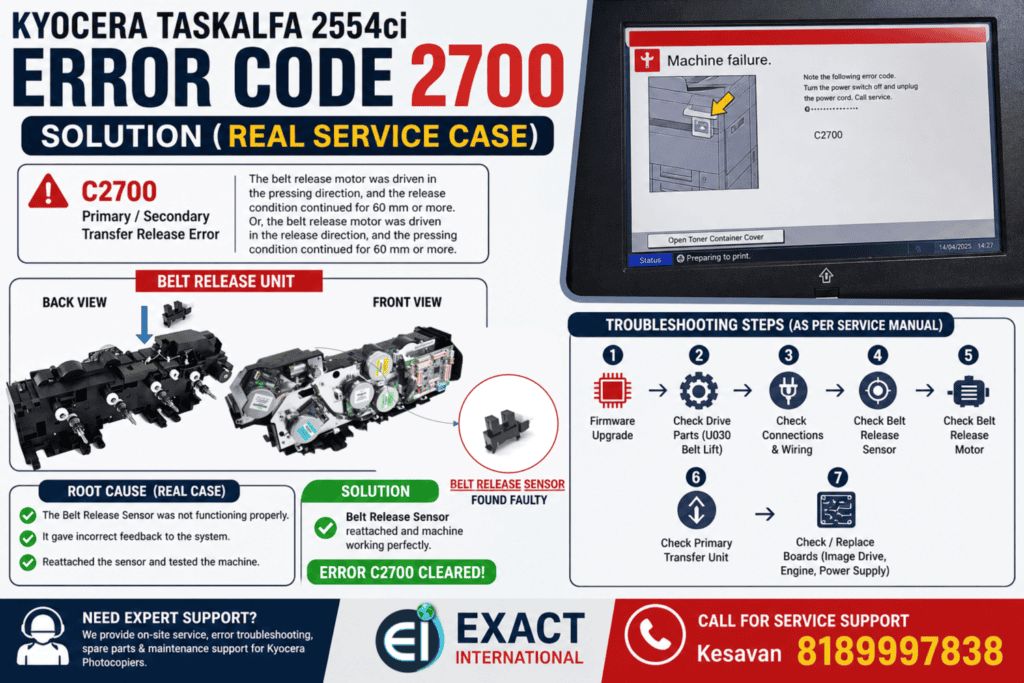
Kyocera Error Code 2700 – Taskalfa 2554ci Solution (Real Service Case)
If you’re facing Kyocera Error Code 2700 on your Kyocera Taskalfa 2554ci, this guide will help you diagnose and fix the issue based on a real service experience. Recently, I encountered this error at a customer location, and after following the service manual step-by-step, I was able to identify and resolve the exact cause. Here’s everything you need to know. What is Kyocera Error Code 2700? Error Code C2700: Primary / Secondary Transfer Release Error This error occurs when: In simple terms, the machine is unable to correctly control the transfer belt mechanism. Possible Causes of C2700 Error According to the service manual, the issue can be caused by: Step-by-Step Troubleshooting (Based on Service Manual) Here’s how I approached the problem: 1. Firmware Check First, verify if the firmware is up to date. If outdated, upgrade to the latest version. 2. Check Belt Release Motor Drive If not, inspect gears and drive transmission. 3. Inspect Wiring & Connectors Carefully check connections between: Clean connectors and ensure proper continuity. 4. Check Belt Release Sensor Reattach or replace if needed. 5. Check Belt Release Motor 6. Replace Primary Transfer Unit If mechanical lift mechanism is faulty, replace the unit. 7–9. Board Replacement (Advanced) If all above steps fail: Real Fix (My Experience) After going through all the above steps at the customer site, I found that: The actual issue was with the Belt Release Sensor Final Solution: Error cleared successfullyMachine returned to normal operation Pro Tips for Technicians Need Help? Contact Expert Support If you’re still facing this issue or need professional service support: Exact InternationalKesavan – 8189997838YouTube – EXACT MFD INFO We provide:
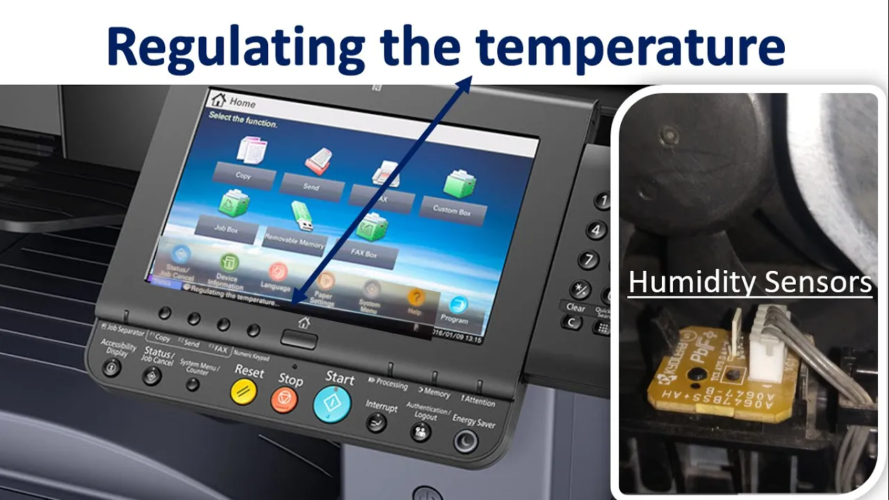
Kyocera 3212i Regulating the Temperature Error – Causes & Solution in Tamil Nadu
The Kyocera TASKalfa 3212i is one of the most reliable A3 multifunction machines used across offices in Tamil Nadu. However, in some locations—especially during peak summer—users may encounter the “Regulating the Temperature” error. This issue can suddenly stop printing operations and affect productivity. In this article, we explain the causes, operating conditions, and safe solution approach for this error. What is “Regulating the Temperature” Error? This error is related to the fuser unit temperature control system. The machine continuously monitors heat levels using a temperature sensor assembly. If: The machine triggers a protective error to prevent further damage. This is a safety protection mechanism, not a basic software glitch. Official Operating Environment (As Per Service Guidelines) The recommended operating conditions for Kyocera 3212i are: In Tamil Nadu, especially during summer months, room temperature often exceeds 35°C. When the machine is installed in: The internal fuser temperature may exceed limits — triggering the regulating temperature error. Why This Error Commonly Occurs in Tamil Nadu and our country’s Based on field experience, the main reasons are: In many cases, overheating is the primary cause. Is There an Official Remedy in the Service Manual? As per the official service documentation:There is no direct permanent remedy listed for this specific error.However, Kyocera provides a special temperature sensor firmware package for certain cases. Important: This firmware is generally used when temperature sensor behavior requires recalibration. Basic Inspection Procedure (For Professional Technicians) Below is a high-level outline of the temperature sensor access procedure (for technical reference only): Cleaning the sensor area may help in certain situations. However, this process involves dismantling multiple mechanical components. It should only be performed by trained service engineers. Important: Do Not Attempt Full Repair Yourself While cleaning and environmental correction may help, installing special firmware or replacing the temperature sensor assembly requires: Improper handling may result in: Preventive Tips to Avoid Temperature Error ✔ Install machine in air-conditioned or well-ventilated room✔ Keep machine away from walls (minimum clearance required)✔ Avoid direct sunlight✔ Use proper voltage stabilizer✔ Perform periodic preventive maintenance Regular maintenance significantly reduces temperature-related errors. Professional Support in Tamil Nadu If your Kyocera 3212i shows the “Regulating the Temperature” error and basic checks do not resolve the issue, professional intervention is required. Exact International is an authorized Kyocera dealer in Chennai with access to: If firmware installation is required, we have the official special firmware package. Need Immediate Support? If your machine is down due to temperature error, don’t wait. Contact Kesavan – 8189997838Exact International – Chennaiexact@exactssd.com We provide fast on-site support across Tamil Nadu.
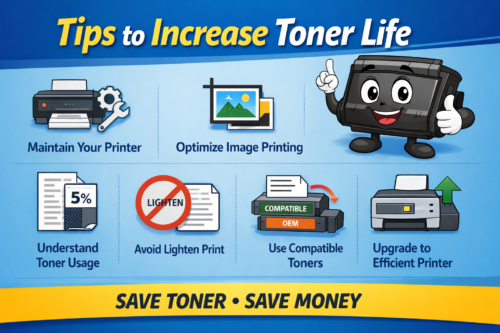
Tips to Increase Toner Life
How to Save Toner in Photocopiers – Tips to Increase Toner Life Maintain Your Printer Regularly Proper maintenance plays a major role in saving toner. Printer jams, dust, and dirty components can lead to toner wastage and poor print quality. Regular servicing helps avoid leakage and ensures smooth operation. ✔ Clean the machine regularly✔ Check toner levels frequently✔ Use built-in cleaning functions For example, software tools in brands like HP can help monitor and maintain printer performance. 2. Understand Toner Usage (Coverage Concept) Toner cartridge yield is calculated based on 5% coverage of an A4 page. This means: So, if you print:✔ Dark images✔ Bold text✔ Full-page designs 👉 Toner consumption will increase faster. Understanding this helps you set realistic expectations for toner life. 3. Avoid Using “Lighten Print” to Save Toner Many users think using the lighten print option will reduce toner usage. But actually: So, avoid using this feature for toner saving. 4. Optimize Image Printing One common mistake is printing images directly from WhatsApp or email without editing. These images often: Better Method: ✔ Open image in PowerPoint✔ Crop only required area✔ Remove unnecessary background This simple step can save a lot of toner. 5. Choose the Right Print Mode Just like an electric bike has Eco / Normal / Sport mode, printing also varies. Example:A machine like Kyocera ECOSYS M2040dn may give 15,000 pages at 5% coverage, but actual output depends on usage. 6. Use Compatible Toner Cartridges Compatible toner cartridges can help reduce cost significantly. Advantages:✔ Lower price (up to 60–80% cheaper)✔ Higher fill capacity in some cases✔ Good performance if quality is maintained However, always choose trusted suppliers to avoid damage to your machine. 7. Print Only What is Necessary Avoid unnecessary printing. ✔ Preview before printing✔ Print only required pages✔ Avoid duplicate prints This reduces toner usage and saves paper. 8. Use Efficient Machines Modern machines like Kyocera ECOSYS MA4000x are designed for better toner efficiency and lower running cost. Upgrading to newer models can improve:✔ Toner usage✔ Speed✔ Overall productivity Conclusion Saving toner is not just about reducing cost — it also improves machine life and efficiency. By following these simple tips, you can:✔ Increase toner yield✔ Reduce printing expenses✔ Improve print quality Contact Exact International Looking for toner, service, or photocopy machines? 📞 Call: 9094095551📧 Email: exact@exactssd.com We provide sales, service, and rental for all major photocopy machines.
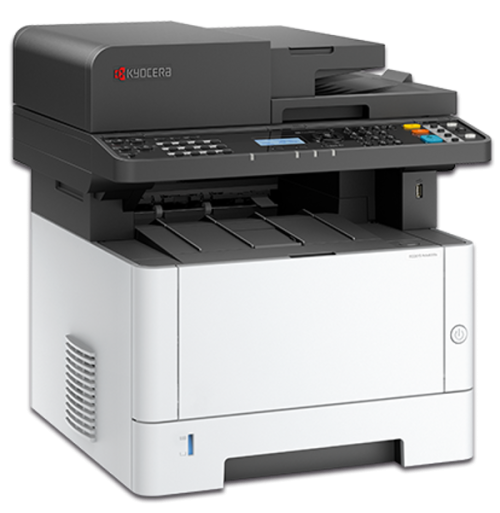
Kyocera 2040 Photocopy Machine
Kyocera 2040 Photocopy Machine – A Trusted Office Copier For the past five years, the Kyocera ECOSYS M2040dn has been one of the most successful A4 and Legal size multifunction photocopy machines used in offices, schools, and business centers. Known for its reliability and strong performance, this machine became a popular choice for businesses that require daily printing, scanning, and copying. Now, Kyocera has upgraded this model with a new and advanced machine called Kyocera ECOSYS MA4000x, offering improved performance and modern features. Why the Kyocera 2040 Was So Popular The Kyocera 2040 machine gained popularity because of its durability and cost-efficient printing technology. Businesses preferred this model for its consistent performance and long-lasting components. Some of the reasons for its success include: ✔ Reliable daily office printing✔ Low maintenance cost✔ High quality black and white printing✔ Easy operation for office staff Key Highlights of Kyocera ECOSYS M2040dn 1. Legal Size Scanning Bed One of the major advantages of the Kyocera 2040 is its Legal size scanning bed, which allows users to scan larger documents easily. This feature is especially useful for offices that handle contracts, legal papers, and long documents. 2. Strong and Durable Build Quality Machines from Kyocera are well known for their strong and long-lasting build quality. The Kyocera 2040 is designed to handle heavy office workloads with minimal breakdowns, helping businesses reduce maintenance costs and downtime. 3. Easy Usability The Kyocera 2040 offers a user-friendly interface that makes printing, copying, and scanning simple for office staff. Even new users can operate the machine without difficulty. 4. High Productivity With fast print speeds and efficient performance, the Kyocera 2040 improves office productivity. It is suitable for workplaces that require regular document printing and copying. 5. Network Connectivity The machine supports network printing, allowing multiple users in the office to connect and print documents easily from different computers. 6. Reliability and Security Kyocera devices are built with reliable components and secure printing features, ensuring safe document handling and consistent performance in busy office environments. 7. Eco-Friendly Technology The Kyocera ECOSYS technology is designed to reduce environmental impact. It offers low energy consumption and long-life components, making it an eco-friendly office printing solution. 8. Print, Copy & Scan Functions The Kyocera 2040 is a multifunction device, combining printing, copying, and scanning in one compact machine, making it ideal for small and medium offices. Upgrade to Kyocera Ecosys MA4000x To meet modern office requirements, Kyocera introduced the Kyocera ECOSYS MA4000x as the upgraded version of the Kyocera 2040. The new model offers: ✔ Faster printing speed✔ Improved scanning features✔ Better connectivity options✔ Enhanced security and efficiency This upgrade ensures businesses get improved performance while maintaining Kyocera’s trusted reliability. Kyocera Photocopy Machine Dealers in Chennai If you are looking for reliable **Kyocera photocopy machines in Chennai, Exact International provides complete solutions including: • Photocopy machine sales• Rental options• Service and maintenance• Genuine spare parts Our team helps businesses choose the right machine based on their office printing needs. Contact Exact International 📞 Phone: 9094095551📧 Email: exact@exactssd.com Contact us today to get the best Kyocera photocopy machine solutions for your office.

Kyocera Photocopy Machine
If you are looking for a reliable and high-performance photocopy machine for your office, Kyocera photocopy machines are one of the best choices available in the market. Known for their durability, low maintenance cost, and excellent print quality, Kyocera machines are widely used in offices, schools, and business centers. At Exact International, we provide sales, rental, and service for Kyocera photocopy machines in Chennai. With more than 20 years of experience in the copier industry, we supply high-quality machines with complete support and service. Why Choose Kyocera Photocopy Machines? Kyocera photocopy machines are designed with advanced technology to deliver reliable performance and cost-effective printing. Some key advantages include: Low running cost High-speed printing and copying Long-life drum technology Energy-efficient design Suitable for office and commercial use These features make Kyocera machines an excellent choice for businesses that require high-volume printing. Photocopy Machine Sales in Chennai Exact International is one of the trusted suppliers of Kyocera photocopy machines in Chennai. We provide both new and reconditioned machines suitable for small offices, corporate companies, and commercial printing shops. Our team helps customers select the right machine based on their printing volume and office requirements. Popular Kyocera models include: • Kyocera TASKalfa 2554ci• Kyocera ECOSYS MA4000x • Kyocera TASKalfa MZ3200i• Kyocera ECOSYS MA4500x• Kyocera TASKalfa 3554ci These machines provide high-quality printing with reliable performance. Photocopy Machine Rental in Chennai Many businesses prefer renting photocopy machines instead of purchasing them. Exact International offers flexible rental plans for Kyocera photocopy machines. Rental benefits include: Low initial investment Free service support Toner and spare availability Quick machine replacement if needed Rental options are suitable for offices, schools, and temporary project requirements. Photocopy Machine Service in Chennai Regular maintenance is essential to keep photocopy machines running smoothly. Our trained technicians provide professional Kyocera photocopy machine service across Chennai. Our service includes: Preventive maintenance Toner replacement Spare parts replacement Error troubleshooting Complete machine servicing We ensure minimal downtime and fast support for all Kyocera machines. Contact Exact International If you are looking for Kyocera photocopy machine dealers in Chennai, Exact International is ready to assist you. Call / WhatsApp: 9094095551Email: exact@exactssd.com We provide Sales | Rental | Service | Spare Parts for all Kyocera machines. Contact us today to get the best photocopy machine solutions for your business.